
If you’re using WordPress, you can add a WhatsApp widget in seconds using a WordPress plugin called ‘Click to Chat’.
Simply install and activate the plugin via your WordPress dashboard (search for ‘click to chat‘ in the ‘add plugin’ section), or download it from the link below:
Install manually? Download the Click to Chat plugin for WordPress here.
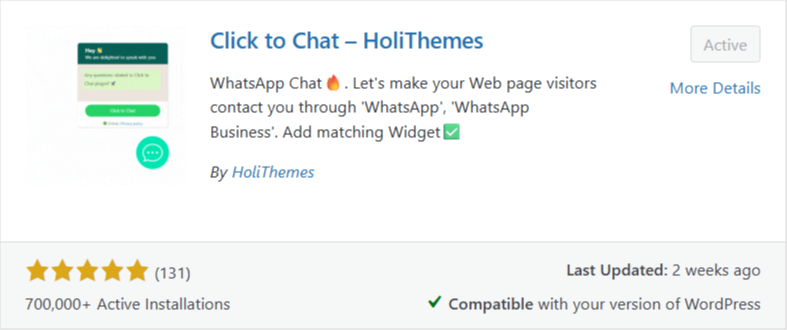
Once activated, go to ‘Click to Chat’ from the left admin navigation in WordPress and follow the instructions to set the plugin how you’d like.
For any other website platform, you simply have to add one snippet of HTML and CSS to every page. In most cases, adding this to the footer of the website puts the WhatsApp widget on all pages your website.
The code: Place the HTML & CSS just before the closing BODY tag in the footer file of your website.
NOTE: The HTML adds the widget to the bottom-left of every page. If you want it to appear bottom-right (which is where our Live Chat widget would also appear), do the following under the .wa-float class:
Change left: 18px; to right: 18px;
You can change the appearance of the widget via the other settings in the .wa-float class.
					<!-- WhatsApp Widget Styles -->
<style>
.wa-float {
    position: fixed;
    left: 18px;
    bottom: 18px;
    width: 50px;
    height: 50px;
    background-color: #25d366;
    color: #fff;
    border-radius: 50px;
    text-align: center;
    font-size: 30px;
    box-shadow: 2px 2px 10px rgba(0,0,0,0.2);
    z-index: 1000;
    display: flex;
    align-items: center;
    justify-content: center;
    text-decoration: none;
    transition: all 0.3s ease;
}
.wa-float:hover {
    background-color: #20b658;
    transform: scale(1.1);
}
</style>

<!-- WhatsApp Widget Button -->
<a href="https://wa.me/YOURNUMBERHERE" class="wa-float" target="_blank">
	<!-- SVG Icon or Emoji -->
	<svg width="50px" height="50px" padding="3px" viewbox="0 0 32 32" xmlns="http://www.w3.org/2000/svg" fill="#ffffff">
		<path d="M19.11 17.205c-.372 0-1.088 1.39-1.518 1.39a.63.63 0 0 1-.315-.1c-.802-.402-1.504-.817-2.163-1.447-.545-.516-1.146-1.29-1.46-1.963a.426.426 0 0 1-.073-.215c0-.33.99-.945.99-1.49 0-.143-.73-2.09-.832-2.335-.143-.372-.214-.487-.6-.487-.187 0-.36-.043-.53-.043-.302 0-.53.115-.746.315-.688.645-1.032 1.318-1.06 2.264v.114c-.015.99.472 1.977 1.017 2.78 1.23 1.82 2.506 3.41 4.554 4.34.616.287 2.035.888 2.722.888.817 0 2.15-.515 2.478-1.318.13-.33.244-.73.244-1.088 0-.058 0-.144-.03-.215-.1-.172-2.434-1.39-2.678-1.39zm-2.908 7.593c-1.747 0-3.48-.53-4.942-1.49L7.793 24.41l1.132-3.337a8.955 8.955 0 0 1-1.72-5.272c0-4.955 4.04-8.995 8.997-8.995S25.2 10.845 25.2 15.8c0 4.958-4.04 8.998-8.998 8.998zm0-19.798c-5.96 0-10.8 4.842-10.8 10.8 0 1.964.53 3.898 1.546 5.574L5 27.176l5.974-1.92a10.807 10.807 0 0 0 16.03-9.455c0-5.958-4.842-10.8-10.802-10.8z" />
	</svg>
</a>
Important! Replace YOURNUMBERHERE with your own WhatsApp number – for example: https://wa.me/447418611071 is ours. Don’t forget the country code, and drop the ‘0’ from the beginning.
Can I just add a link to open WhatsApp?
Yes, and it’s super-easy! Just use https://wa.me/YOURNUMBERHERE as the link URL.
Looking for our Live Chat install guide? Click here!
Message us via WhatsApp!